USD
USDFree U.S. Shipping for Orders $49+
Subscribe & Save
 USD
USDFree U.S. Shipping for Orders $49+
Subscribe & Save
Shop Categories
Best Sellers

New From Homekind™ by Gundry MD
A portable 5-stage medical-grade air purifier with your choice of HEPA 13 or HEPA 14 filtration — designed to help support cleaner air at home.
Your Health Education Center
New
Online Course
Dr. Gundry's
A step-by-step online course to help you slim down, boost energy, and feel years younger — in just 90 days.
Featured Articles
Featured Recipes
Let’s be honest – it can be hard to cut out lectin-heavy foods from your diet entirely… especially if we’re talking about dietary stables you depend on. Now, you should try to avoid lectin-rich foods as much as possible – but if that’s not an option for you, there are a few things you can
Indulgence is part of human nature. And you should be able to indulge in something decadent when you crave it. But knowing what to indulge in can keep you on track and feeling better in the long run. So, what do you crave? How about this lectin free bread mix recipe for a rolled hazelnut
Being on a lectin-free diet isn’t about deprivation. It’s about teaching yourself the best ways to make most of the foods you love — even comfort foods — without using lectin-rich ingredients. And if you miss doughy, fragrant, savory cheesy bread, this lectin-free bread mix recipe is for you. Dr. Gundry’s take on garlic cheddar
Three cheers for summer nights! And for a tasty, lectin-free BBQ.
If you grew up loving matzo ball soup at your family’s Jewish holiday celebrations, but you’re avoiding gluten (and pesky lectins), this one’s for you. This Gluten-Free, Lectin-Free Chicken Soup with Millet Matzo Balls, created by Claudia Curici, takes all the comfort and tradition of classic Jewish matzo ball soup and gives it a gut-friendly
Here it is! – This Halloween, treat your guests to something delicious and deceptively healthy! My Spooky 7-Layer Halloween Taco Dip is a frightfully fun twist on a party classic — layered with gut-nourishing, lectin-friendly ingredients like creamy guacamole, antioxidant-rich pomegranate salsa, and fiber-packed black beans. Each bite is bursting with flavor and supports your
Indulgence is part of human nature. And you should be able to indulge in something decadent when you crave it. But knowing what to indulge in can keep you on track and feeling better in the long run. So, what do you crave? How about this lectin free bread mix recipe for a rolled hazelnut
Being on a lectin-free diet isn’t about deprivation. It’s about teaching yourself the best ways to make most of the foods you love — even comfort foods — without using lectin-rich ingredients. And if you miss doughy, fragrant, savory cheesy bread, this lectin-free bread mix recipe is for you. Dr. Gundry’s take on garlic cheddar
Shop
BESTSELLERS
TOP CATEGORIES
Learn
Dr. Gundry's Total Body Transformation Plan
The Dr. Gundry Diet Food List
Your Health Education Center
Healthy Foods & Eating
Living Well & Fit
Lectin-free Recipes
About Supplements
About Lectin-free Food
About Skin & Hair Care
Ingredient Resource Center
Books by Dr. Gundry
About Dr. Gundry
USDAccount Main
Profile & Settings
Orders
Subscriptions
Warranty Registration
To update your address in your account:
Log in to My Health Account by clicking here.
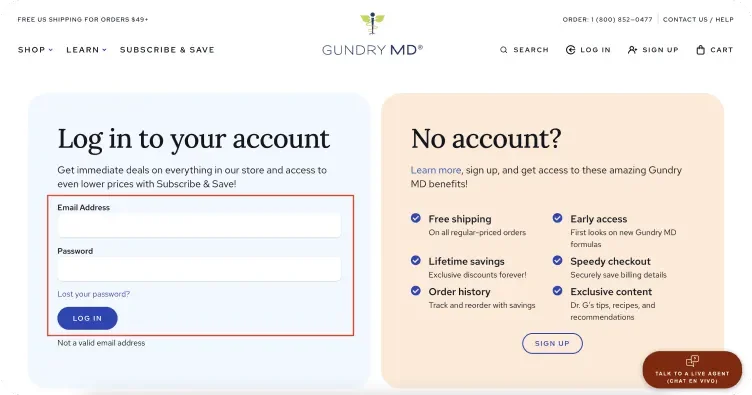
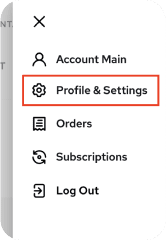
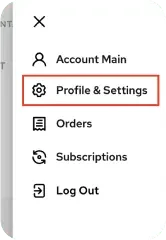
Access Profile Settings: Once logged in, use the Top Right Menu dropdown to go to Profile & Settings.

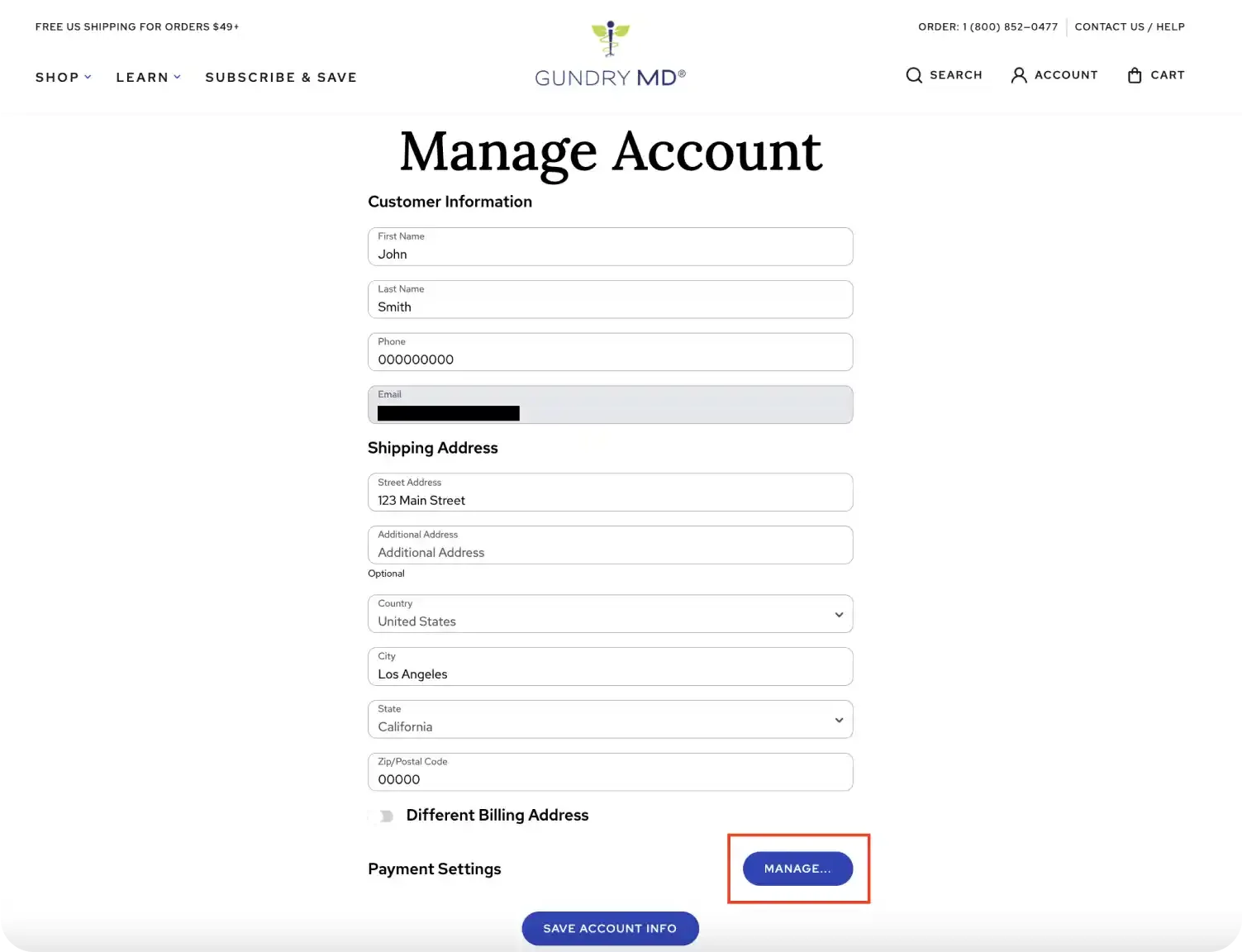
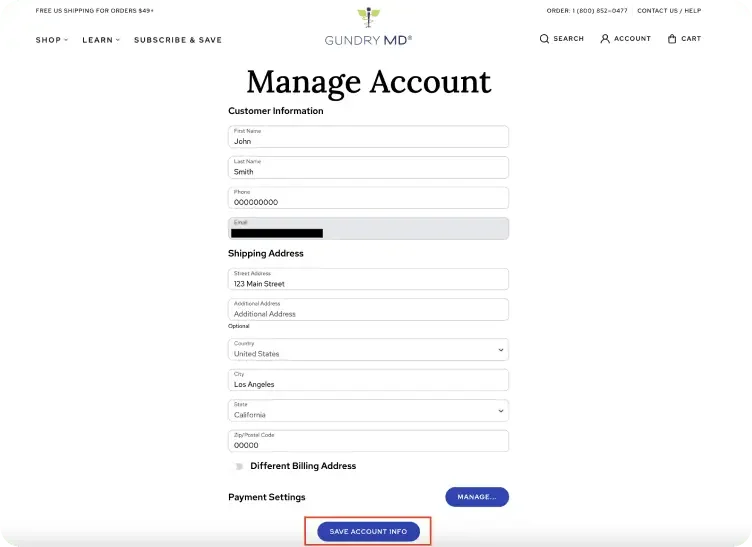
Update your Address: In Profile & Settings, you’ll find options to update your Billing Address and Shipping Address.
Save Changes: When you’ve completed all updates, click the Save Account Info button at the bottom of the page to ensure your changes are saved.
If you’re still having trouble, contact us for assistance from one of our specialized agents. (800) 852-0477
To update your payment information in your account:
Log in to My Health Account by clicking here.
Access Profile Settings: Once logged in, use the Top Right Menu dropdown to go to Profile & Settings.
Locate Payment Settings: Scroll to the Payment Settings section at the bottom of the page and click on Manage.
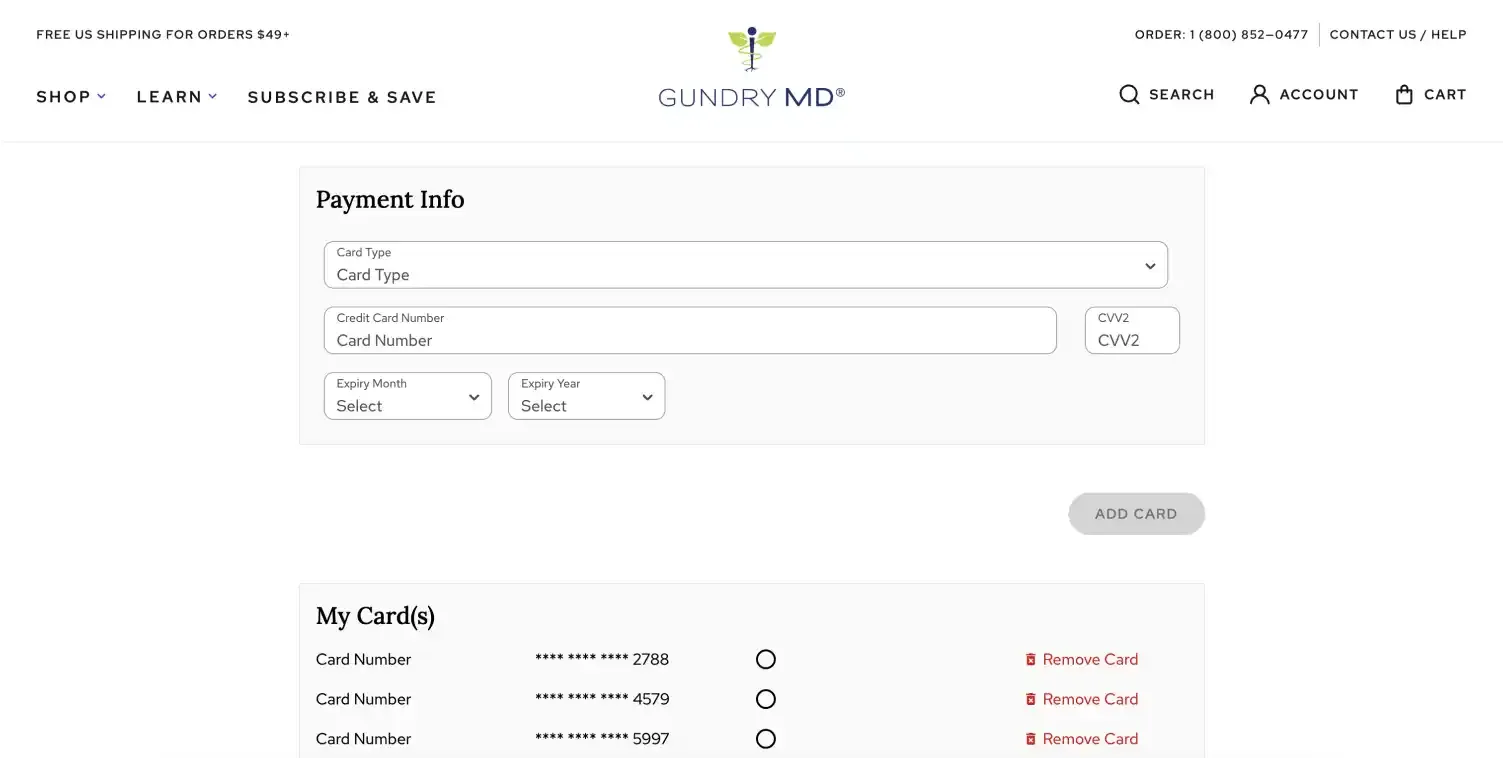
Here you can select Default on the Card you would like to set as your Default Payment for your account. You can also update your credit card details here, including adding a new card or removing an existing card.
Save Changes: When done, click Save Account Info at the bottom of the page to confirm and save your changes.
If you need further assistance, our support team is available to guide you. (800) 852-0477
To add or remove a credit card from your account:
Log in to My Health Account by clicking here.
Access Profile Settings: Once logged in, use the Top Right Menu dropdown to go to Profile & Settings.
Locate Payment Settings: Scroll to the Payment Settings section at the bottom of the page and click on Manage.
Manage Your Credit Card:
To add a new card, click the Manage button, enter your new credit card details, and Add Card.
To remove an existing card, click on Remove Card with the trash can icon next to the card you want to delete.
For additional help, please reach out to us and a specialized agent will assist you. (800) 852-0477
To adjust how often your subscription delivers:
Log in to My Health Account by clicking here.
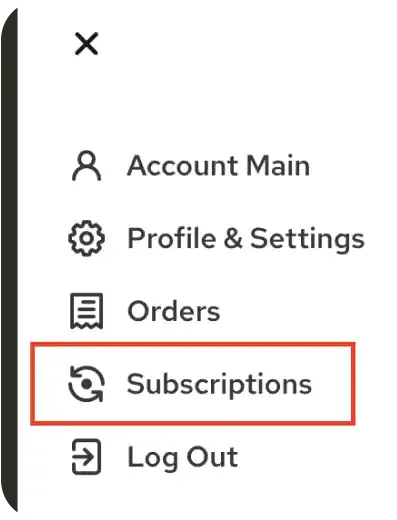
Access Subscriptions: In the Top Right Menu, go to Subscriptions.
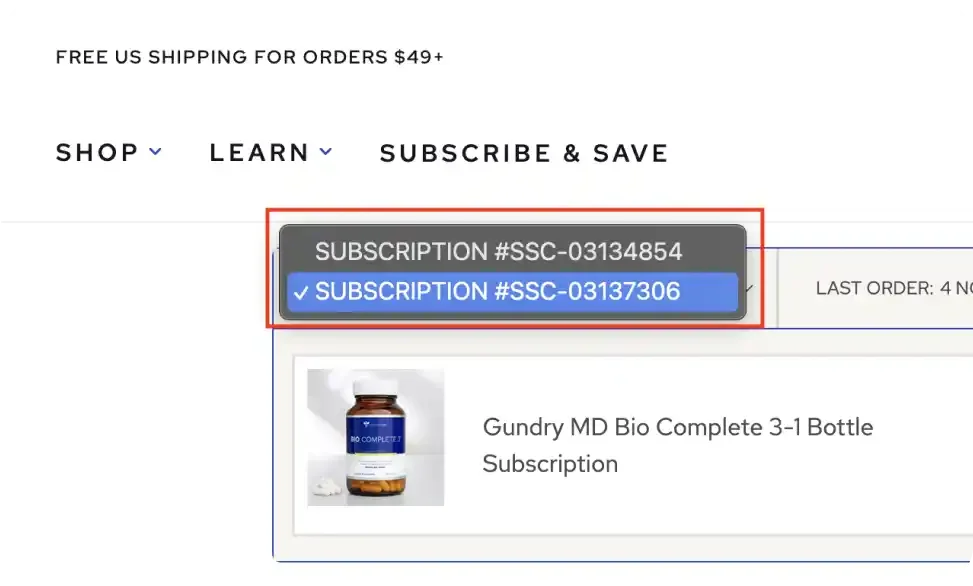
If you have more than one active subscription, make sure to choose the Subscription you’d like to update from the dropdown menu to the left.
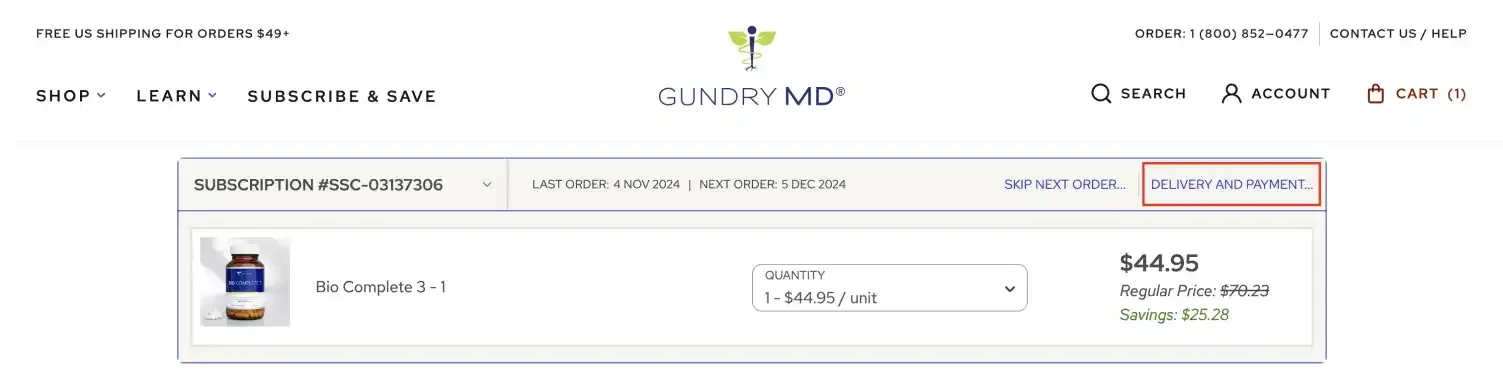
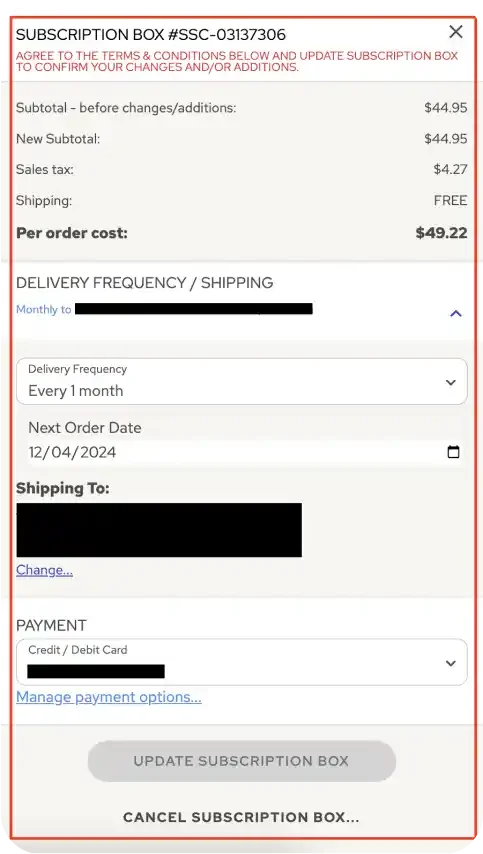
Edit Subscription Frequency: Click Delivery and Payment on the subscription you want to modify. Click Delivery Frequency/ Shipping, you can set a new Frequency (how often you receive orders).
Save Changes: Click Update Subscription Box at the bottom to save your updates.
If you need further help, please contact our support team. (800) 852-0477
To change the next ship date for a subscription:
Log in to My Health Account by clicking here.
Access Subscriptions: In the Top Right Menu, go to Subscriptions.
Modify Next Ship Date: Find the subscription you want to adjust, and click Delivery and Payment on the subscription you want to modify. Under Delivery Frequency/ Shipping, you can set a new ship date by clicking on the calendar under Next Order Date, and changing the Next Ship Date to your preferred delivery date.
Save Changes: Click Update Subscription Box at the bottom to save your updates.
If you need further help, please contact our support team. (800) 852-0477
If you need to change the delivery address for an active subscription:
Log in to My Health Account by clicking here.
Access Subscriptions: In the Top Right Menu, go to Subscriptions.
Modify Next Ship Date: Find the subscription you want to adjust, and click Delivery and Payment on the subscription you want to modify.
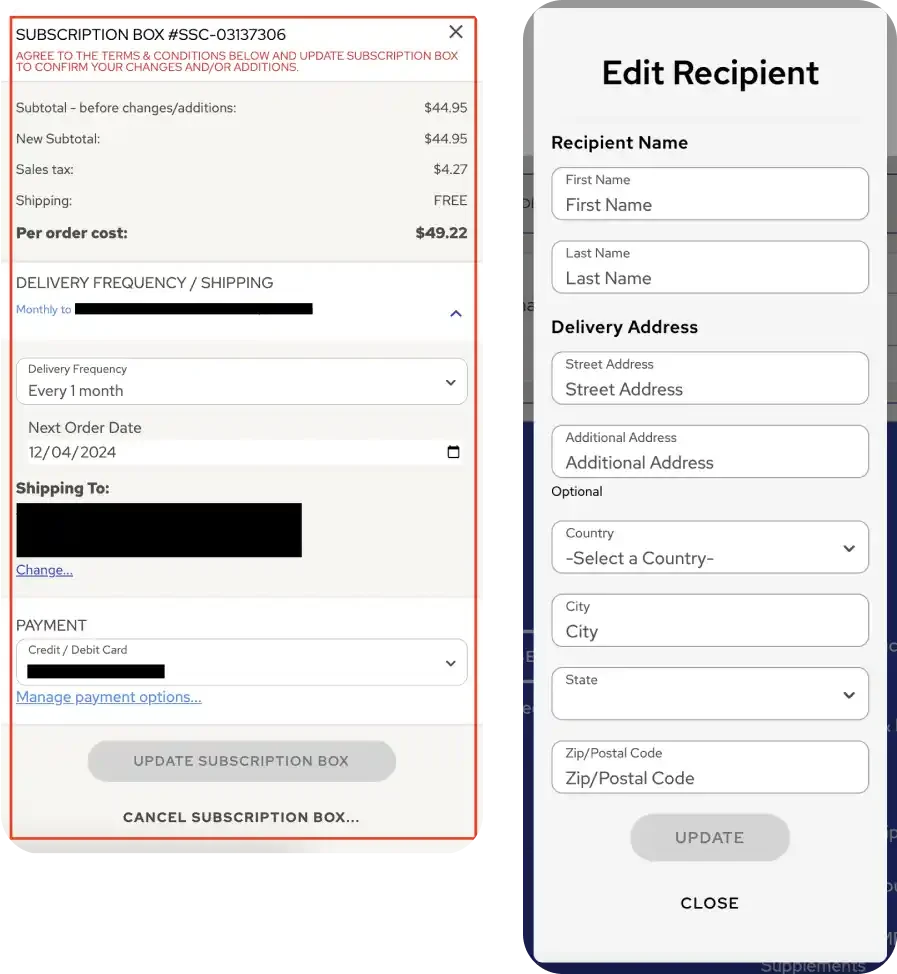
Update Shipping Address: Under Delivery Frequency/ Shipping, click on “Change...” located under the Shipping to change your delivery address.
Save Changes: Click Update at the bottom to save your updates.
If you need further help, please contact our support team. (800) 852-0477
Loading...